Posts

Duke University's: RUST Fundamentals on Coursera

I recently started Duke University's Rust Fundamentals course on Coursera.  The course lasts 4 weeks and covers several topics. It is taught by Noah Gift who has several classes on the Coursera that I am interested in taking over the next year. The classes that I am particularly interested in are those related to Python, Rust, and Linux . Yesterday, I encountered problems installing Rust on Linux (Ubuntu).  The problems were related to the following code:      curl --proto '=https' --tlsv1.2 -sSf https://sh.rustup.rs | sh As I needed to install curl, I ran the following command:      sudo snap install curl This led to several errors. After much searching on the internet, I discovered that I needed to stall curl without using snap. Instead, I installed curl using:     sudo apt install curl. After this, I was successfully able to install Rust. 
2023 WDB: Update

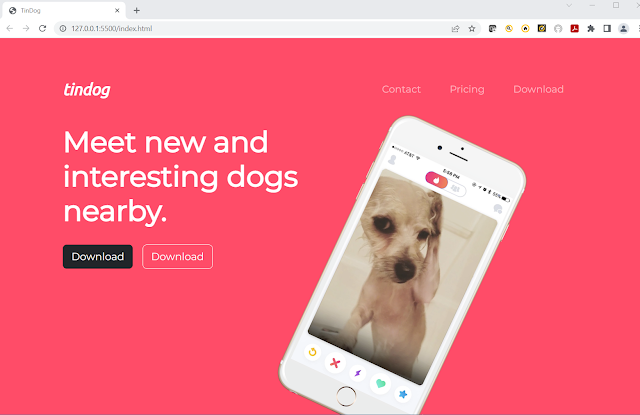
  I haven't been working on the Web Development Bootcamp (WDB) over the last few days because I have been working on my crypto project. I have tried to integrate Recurrent Neural Networks to predict crypto prices. I decided to go back to the WDB today.  Upon logging into the course, I found that the instructor (Angela) has updated all the course content.  This means that I should go back and review the content to see what has been added, changed, and deleted.  I believe that the (tindog) project is still the same but I did notice that the video style and content are different.  I think that this is good because in the previous videos, Angela discussed using VS Code as an IDE but her videos still showed the Atom ide.

2023 WDB: Introduction to Bootstrap 4 & 5 -- Day 14

Image
  Here are the changes that I made to the website: This was the site from the previous day:

Problems with Font Awesome: WDB Bootcamp 2023 -- Day 15

Image
The Bootstrap challenge required us to use Font Awesome and Bootstrap's containers to add icons and make the layout more responsive.  Incorporating Bootstrap's containers was easy. The problems came with Font Awesome... Before I begin here is what I was able to do with Font Awesome and containers: Here is the code for this section:   < section id = "features" >     < br >     < br >     < div class = "row" >         < div class = "col-lg-4" >           < i class = "fa-sharp fa-solid fa-circle-check fa-2xl awesome" ></ i >           < h3 > Easy to use. </ h3 >           < p > So easy to use, even your dog could do it. </ p >         </ div >               < div class = "col-lg-4" >          ...

2023 WDB: Introduction to Bootstrap 4 & 5 -- Day 13

Image
  Today, Angela covered Bootstrap 4 & 5 padding and button styles. Here is the website with padding: And here is the website with stylized buttons for "Downloading". I changed the color of the website to make the buttons easier to read.

2023 WDB: Introduction to Bootstrap 4 & 5 -- Day 12

Image
  Bootstrap Grid Layout System In today's video, Angela Yu discussed Bootstrap's grid layout system. The most important takeaway was how Bootstrap's system automatically responds to changes in the browser's layout. Code Here are the different examples of Bootstrap responses as the browser size changes from desktop to phone.

2023 WDB: Introduction to Bootstrap 4 & 5 -- Day 11

Image
  What is TinDog? TinDog is a web page project designed by Angela Yu in order to learn Bootstrap. She recommends following along with the project as it will help us pick up Bootstrap 4 & 5 quickly. Although I am more interested in developing a fan site for Real Madrid, I have decided to follow along with the TinDog project so that I can learn Bootstrap better. Here is the code for the NavBar using codeply: Here is the basic website template Here is the website with the new Navbar and basic Bootstrap styling:

2023 WDB : Introduction to Bootstrap 4 & 5 -- Day 10

Image
  I continued learning about Bootstrap 4 & 5 today. It is an interesting topic but it is difficult to make sense of the lessons if you are not doing the project specified by the professor.  She would like us to develop a platform called "Tinderdog"; however, I prefer to continue to work on my fan page. I added a navbar to the website today.   In order to get the dropdown menu to work, I needed to add the Popper and JS script tags. I will need to continue to work on the navbar but at least I am making daily progress.

2023 WDB: Introduction to Bootstrap 4 -- Day 9

Image
In this next section, we are covering Bootstrap 4. It seems that it will be a very complicated subject so I will be working on the topic in parts. Today, I will be installing Bootstrap and playing with some of its styles. On going to the Bootstrap section, I noticed that the newest version is Bootstrap 5 and not 4. The Bootstrap 5 link for CSS < link href = "https://cdn.jsdelivr.net/npm/bootstrap@5.3.0-alpha1/dist/css/bootstrap.min.css" rel = "stylesheet" integrity = "sha384-GLhlTQ8iRABdZLl6O3oVMWSktQOp6b7In1Zl3/Jr59b6EGGoI1aFkw7cmDA6j6gD" crossorigin = "anonymous" > This was the first page before Bootstrap 5: This is the same page after Bootstrap 5:

Frontend Web Development Bootcamp Course (JavaScript, HTML, CSS) - Day 1

  I saw this course on YouTube and became very interested because, unlike other courses on web development, this course starts with JavaScript (JS).  I have tried to learn JS before but I went back to Python.  Angela Yu's WDB teaches JS but she starts with HTML and CSS first which is unlike this course. So what is so important about JavaScript (JS)?  From content I found on the web, I noticed that it is more important and difficult to learn JS rather than HTML and CSS.  Also, I have decided that going forward I want to focus on Python and JavaScript. JavaScript Variables  Note: console.log() and FireFox browser  Comments : // and /* */ - const TAX_RATE = 0.08; --- constant variable - let hello_people = 'Hello World !"; - var time = 60;   ... don't use "var" use "let" - JS style guides: Naming conventions (example: camelCase) Note: stopped the video at naming conventions -> 1:21:29

Aprende HTML ahora! curso completo GRATIS desde cero -- HolaMundo -- Part 1

Image
  In order to improve my Spanish comprehension and learn more about HTML, I followed a tutorial by HolaMundo on HTML. The course is 1 hour and 30 minutes; Today followed the first 30 minutes of the course. Below is what  was covered in the first part of the course:   <!-- contenido de nuestra web -->     contenido de nuestra web     < h1 > Mi primer heading </ h1 >     < h2 > Mi segundo heading </ h2 >     < h3 > Mi tercer heading </ h3 >     < h4 > Mi cuarto heading </ h4 >     < h5 > Mi quinto heading </ h5 >     < h6 > Chancito feliz </ h6 >     < br >     < p > Chancito feliz está muy feliz. </ p >     < p > Chancito triste está muy triste. </ p >     < hr >     < h2 > Chancito felipe. </ h2 >     < p > Texto u...

2023 Web Development Bootcamp (WDB): Intermediate CSS -part 4 Day 8

Image
  I have decided to abbreviate the class to WDB which will make it a lot easier to mention and reference. One of the topics discussed today was "Adding Content to the Website". Although the project is a personal website, I have decided to continue developing the Real Madrid fan website. Topics covered today: - CSS Sizing - CSS Float and Clear These topics were interesting but were not really related to my fan webpage. I will come back to these topics at a later date. The New Webpage: The big difference between this website and the earlier versions is that the trophies photo is now centered.

2023 Web Development Bootcamp : Intermediate CSS part3 - Day 7

Image
  Changes : I made changes to the header of the website yesterday. Here is the new code: #logo1 {     height : 250px ;     position : relative ;     left : 100px ;   } .team {     height : 250px ;     position : relative ;     left : 150px ;     top : 10px ; } #logo2 {   height : 250px ;   position : relative ;   left : 200px ; } And here is the new website: Absolute Positioning A lot of info on positioning but no real connection to the personal website. Centering Elements with CSS note: text-align: center; margin: 0 auto 0 auto; Font Styling using CSS Note: Two major font families: serif and sans-serif; Google fonts. This is another large topic and I will come back to it as needed.  I changed the font of my website to Arial for now. body {     background-color : #c7f6fd ;     font-family : Arial , Helvetica , sans-serif ;   }   h1 {     color : r...

2023 Web Development Bootcamp: Intermediate CSS Part 2 -- Day 6

Image
  I started learning about the CSS box model, the CSS display property, and CSS static and relative positioning. This was a lot of information to absorb( ingest) in one sitting.  While the topic was interesting and is important to master, I decided to just learn by doing.  So I downloaded 2 new photos to display at the top of my website. CSS Images and Relative Positioning Here is the code that I used: .logo {     height : 400px ;     position : relative ;     left : 100px ;       } .team {     height : 400px ;     position : relative ;     left : 150px ;     top : 10px ; } And here is the result: Here is the new page: Note: The trophy photo's width is 100% of the browser screen so this is why it is being pulled across the whole screen. This is my opinion.

2023 Web Development Bootcamp: Intermediate CSS -- Day 5 Part 1

Image
  Day 5 of Angela Yu's Web Development Bootcamp and today I am learning more about CSS. I am continuing to work on a Real Madrid Fan webpage. Favicons I was able to find a Real Madrid favicon on favicon.cc and successfully downloaded it.  Unfortunately, I had problems with the link. I first tried: < link rel = "icon" href = "favicon.ico" > But this didn't work... so I used the following code: < link rel = "icon" href = "favicon.ico?v=2" > This did the trick and now I have a nice favicon. HTML Divs DIV stands for content divider element. Need to remember that each browser comes with its own default styles. I planned with the div elements and various styles and colors. Below is what I went with for the website today. I don't like the colors but it illustrates the div elements really well.

2023 Web Development Bootcamp : Introduction to CSS -- Day 4

Image
  Today, I started learning CSS. This is the fourth day of the course.  I am still working on a website for Real Madrid. I am hoping that this will section will help me improve my La Liga tables. Inline CSS This was my first background color.  < body style = " background-color: blanchedalmond;" > This was the second color that I used. < body style = " background-color: rgb(238, 235, 232);" > I don't really like the colors but I implemented them to learn about background colors. Note: Looking for colors in colorhunt.co I choose this color just for fun. < body style = " background-color: #C3F8FF;" > I choose this color for today.. < body style = " background-color: #F9F9F9;" > Internal CSS Here are the changes that I made to the first page of the website just for fun.         < style >             body { background-color : #F9F9F9 ;             }   ...

2023 Web Development Bootcamp:: Personal Website Day 3 -- Tables

Image
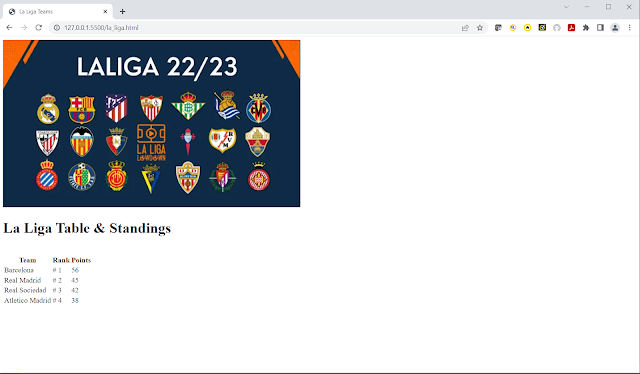
  Day 3 topics: Tables Layout Forms I will be using the HTML tables to format the La Liga team page. I want to make the La Liga page more interesting. I will be using the data from skysports.com for the La Liga table. I added a title and a picture. HTML Tables Note:  <table>,  <tr>, <td>, <thead>, <tbody>, <tfoot>

2023 Web Development Bootcamp:: Personal Website Day 2 continued

Image
  Continuing to develop the personal website.  Topics: HTML Image Element Note: <img src = "angela.png"> HTML Links  Note: <a href = "" > </a>

2023 Web Development Bootcamp: Personal Website -- Day 2

Image
  Today is day 2 of the 2023 Web Development Bootcamp.  Today's topic is building a personal website. HTML Boilerplate exercise #1: Type out boilerplate code <! DOCTYPE html> <html lang = "en">        <head>              <meta charset = "UTF-8">               <title> Real Madrid Fan Page</title>     </head>     <body>               <h1> Real Madrid Rules: World Champions</h1>     </body> </html> Of course this is  a lot easier with VS Code: Structure Text in HTML Note: Use emphasis tag <em> rather than italic tag <i> Note: Use strong tag <strong> rather than bold <b> HTML Lists Tags: <ul>, <ol>, <li>

Le Deep Learning de A á Z: KerasClassifier problem

Image
Today, I was working on the section "Évaluer, améliorer et ajuster l'ANN" when I ran into a coding problem with the KerasClassifier. The instructor had not updated the code in the course and so I received an error. Having looked over my datacamp notes on deep learning, I was able to fix the problem with tensorflow.keras.wrappers.sckit_learn ...  Learnings: Good to have notes from multiple learning platforms and teachers